GAA Scoreboard Guide
Score goals, points and two-pointers on the KeepTheScore GAA scoreboard, with a count-up match clock and injury time — on a TV, LED panel or your stream.
Run the score for your club championship match, county final, or training game the way GAA scores are actually written: goals and points, like 2-10 (16). The KeepTheScore Gaelic football scoreboard is a free, online scoreboard you update by tapping — goal, two-pointer, or point — with a match clock that counts up through each half and runs into injury time, just like the referee's watch. Show it on a clubhouse TV or pitch-side LED panel, share a link, or drop it into your live stream. This guide walks through how it works.
The control panel vs the display scoreboard
Your GAA board has two sides, and it helps to know which is which.
The control panel is where you keep score. You reach it by opening your board's admin link — the private link you got when you created the board. It shows the scoring buttons for both teams, the match phase and injury-time controls, and the clock. Keep this link to yourself, or share it only with people you trust to run the match.
The display scoreboard is what everyone else sees: the clean, big-screen view with no buttons. You share it with the presentation link — a view-only link anyone can open to watch the score. Put it on a TV in the clubhouse, send it to supporters, or use it as a browser source in your streaming software. Whatever you tap on the control panel updates the display scoreboard live, on every screen at once.
There's also a scorekeeper link if you want a helper to enter the score without being able to change your settings or reset the match.
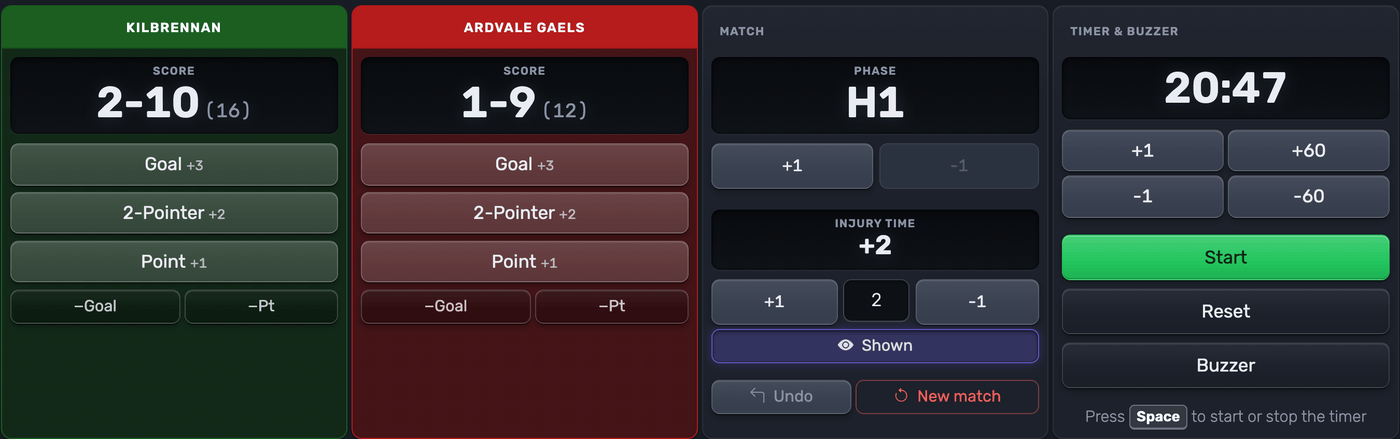 The control panel — one tap per score, with corrections and undo
Tip: always think in terms of links, not files or apps. Copy the link you need and share it — that's all there is to it.
The two layouts
Gaelic football comes with two display layouts. Switch between them any time in the Setup panel — the change shows up instantly on every screen.
Streaming scorebug
A compact broadcast-style bar with both team panels, the goals-points scores, and a centre clock block with the half indicator. It has a transparent background, so in OBS, Streamlabs or vMix it sits cleanly over your camera feed — the kind of score strip you see on a televised championship match. Use it for:
- Streaming to YouTube, Facebook Live, Twitch or anywhere else
- Adding the score as an OBS/Streamlabs browser source over your match footage
 The streaming scorebug, built to sit over a live stream
LED panel
A high-contrast layout that fills a 2:1 screen edge-to-edge: huge scores in each club's colours and a black clock strip along the bottom, readable from the far stand. On a screen with a different shape it centres itself without distorting. Use it for:
- Pitch-side LED panels and venue screens
- A clubhouse TV or projector where you want the score readable from a distance
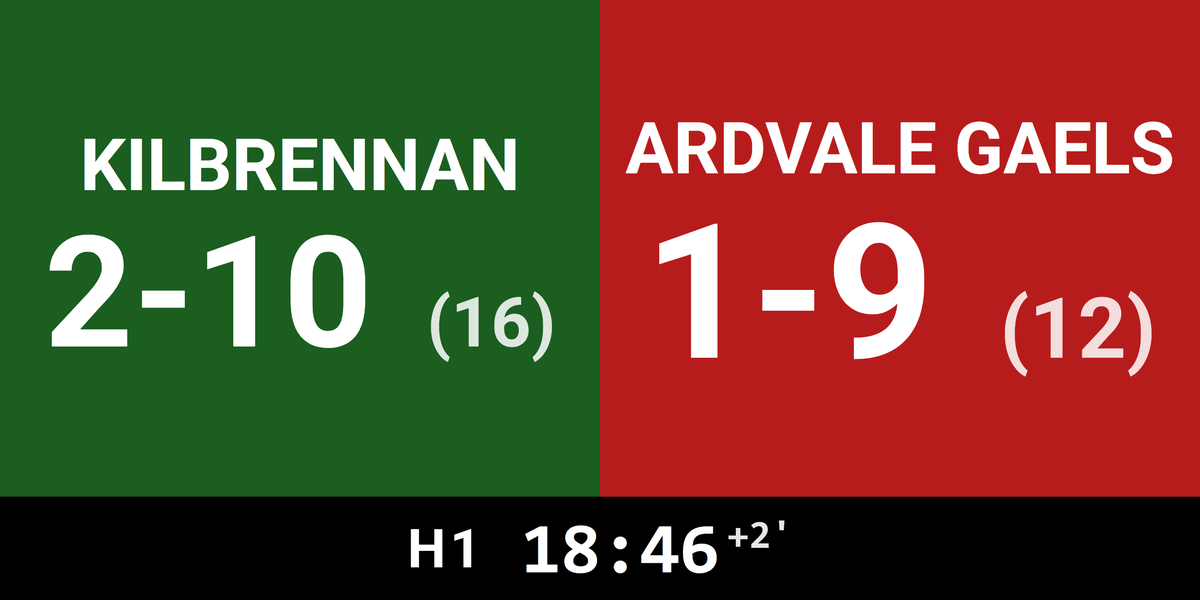 The LED panel layout — big scores, team colours, clock strip
The most important features
Scoring a match
GAA scoring has three buttons per team, matching the umpire's flags:
- Goal (green flag) — ball in the net, worth 3 in the total
- 2-Pointer (orange flag) — a kick from on or outside the 40m arc, adds 2 to the points column
- Point (white flag) — over the crossbar, adds 1
The score always reads in the official notation — goals-points, like 2-10 — and you can show the combined total in brackets, 2-10 (16), with a toggle in Setup. Only you tap; the board does the arithmetic.
Fixing mistakes
Mis-taps happen. Two ways to put things right:
- Undo reverses your last scoring action, exactly.
- The −Goal and −Pt buttons nudge one column down when you just need to correct a single number.
The match clock and injury time
The clock counts up, like the referee's watch: 0:00 to 30:00 in the first half, 30:00 to 60:00 in the second — or 35-minute halves if you choose senior inter-county length in Setup. At the end of a half the clock keeps running into injury time, and you can show an injury-time indicator (like +2') next to the clock: set the number of added minutes on the control panel and toggle it visible when the fourth official raises the board.
Half-time and full-time
The match phase — H1 → HT → H2 → FT — is one tap on the control panel. Moving to a new half re-seats the clock at the right starting time automatically. At full-time the board shows FT with the final score.
The goal celebration
When you tap Goal, the display plays a big GOAL across the board in the scoring team's colours — great on a stream or a pitch-side screen. Points and 2-pointers don't get one; a match has dozens of them.
Switch it on or off in Setup, under Celebrations, where you can also pick its style, whether the team logo takes part and, once Enable Audio on Public View is on, its sound. ▶ Preview plays it on your screen only. New boards start with it on; on a board you created before, switch it on in Setup.
Starting a new match
Tap New match to clear the score, clock and match phase. Your club names, colours and settings are kept, so you're ready for the next game in a second.
Setting up your board
Open the Setup panel to shape the board before throw-in:
- Club names and colours for both teams
- Half length — 30 minutes (club standard) or 35 minutes (senior inter-county)
- Which details to show — the derived total, the match clock, the half indicator
- Whether a goal plays a celebration, and how it looks and sounds
- The board title, fonts and colours, and your layout choice
- Enable Audio on Public View if you want the buzzer and the goal sound heard on shared screens
Hurling and camogie
Hurling and camogie use the same goals-points notation, so the board works for them out of the box — just ignore the two-pointer button, which is a football-only rule.
Putting it on a stream
Both layouts work as a browser source in OBS, Streamlabs, vMix and similar tools — paste the presentation link and the score updates itself, with no plugins to install. The streaming scorebug is purpose-built for this. For step-by-step setup, see the streaming software guide.
Sharing your scoreboard
Share the right link for the job: the presentation link for supporters and screens, the scorekeeper link for a helper entering the score, and the admin link for a co-organiser who needs full control.
Related guides
- How Gaelic football scoring works — goals, points, the two-pointer and the rules behind the numbers
- Customizing your scoreboard — colours, layouts and fonts
- Scoreboards on a TV — display on venue screens
- Streaming software — OBS, Streamlabs, vMix and more
- All scoreboard types — every sport we support
Ready for throw-in?