Basketball, baseball and football have the deepest field coverage; the others cover core scoring plus a reset. The full reference below lists the exact endpoints each sport exposes.
Everything else is read-only for now. You can GET the scoreboard data, but you can't update it via the API. That covers Tennis, Softball, and the rest.
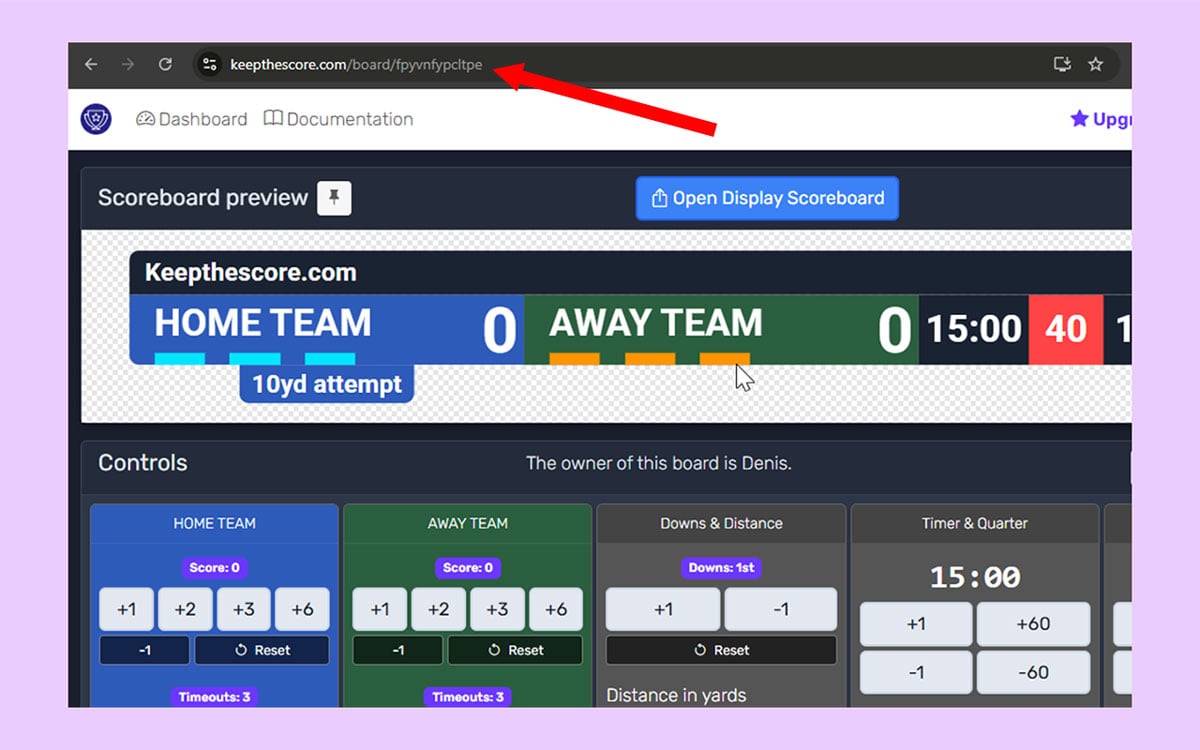
Sports scoreboards authenticate using the same token that's already in your board's URL.
Map the API to physical buttons so you can run the scoreboard without touching a laptop mid-game:
The full reference is below, generated from the live API.
Endpoints
General
GET
/api/v1/sport/{token}/
Return all sport scoreboard data as JSON.
Path parameters
Name Type Required Description
tokenstring
yes The token of the board to retrieve.
Responses
Status Meaning Body
204No Content
—
400Malformed request
—
403This token does not allow the board to be edited
—
404Board not found
—
429Too many requests
—
500Internal server error
—
Baseball
POST
/api/v1/sport/{token}/baseball/away/runs/increment
Increment away team runs for baseball.
Path parameters
Name Type Required Description
tokenstring
yes
Responses
Status Meaning Body
200OK
MessageResponse
400Malformed request
—
403This token does not allow the board to be edited
—
404Board not found
—
429Too many requests
—
500Internal server error
—
Response body (200) — MessageResponse (JSON)
Field Type Always present Description
messagestring
yes Status message
POST
/api/v1/sport/{token}/baseball/balls/increment
Increment balls count for baseball.
Path parameters
Name Type Required Description
tokenstring
yes
Responses
Status Meaning Body
200OK
MessageResponse
400Malformed request
—
403This token does not allow the board to be edited
—
404Board not found
—
429Too many requests
—
500Internal server error
—
Response body (200) — MessageResponse (JSON)
Field Type Always present Description
messagestring
yes Status message
POST
/api/v1/sport/{token}/baseball/base/1/toggle
Toggle runner on first base.
Path parameters
Name Type Required Description
tokenstring
yes
Responses
Status Meaning Body
200OK
MessageResponse
400Malformed request
—
403This token does not allow the board to be edited
—
404Board not found
—
429Too many requests
—
500Internal server error
—
Response body (200) — MessageResponse (JSON)
Field Type Always present Description
messagestring
yes Status message
POST
/api/v1/sport/{token}/baseball/base/2/toggle
Toggle runner on second base.
Path parameters
Name Type Required Description
tokenstring
yes
Responses
Status Meaning Body
200OK
MessageResponse
400Malformed request
—
403This token does not allow the board to be edited
—
404Board not found
—
429Too many requests
—
500Internal server error
—
Response body (200) — MessageResponse (JSON)
Field Type Always present Description
messagestring
yes Status message
POST
/api/v1/sport/{token}/baseball/base/3/toggle
Toggle runner on third base.
Path parameters
Name Type Required Description
tokenstring
yes
Responses
Status Meaning Body
200OK
MessageResponse
400Malformed request
—
403This token does not allow the board to be edited
—
404Board not found
—
429Too many requests
—
500Internal server error
—
Response body (200) — MessageResponse (JSON)
Field Type Always present Description
messagestring
yes Status message
POST
/api/v1/sport/{token}/baseball/count/reset
Reset balls and strikes to zero.
Path parameters
Name Type Required Description
tokenstring
yes
Responses
Status Meaning Body
200OK
MessageResponse
400Malformed request
—
403This token does not allow the board to be edited
—
404Board not found
—
429Too many requests
—
500Internal server error
—
Response body (200) — MessageResponse (JSON)
Field Type Always present Description
messagestring
yes Status message
POST
/api/v1/sport/{token}/baseball/final/toggle
Toggle the FINAL state of a baseball scoreboard.
Path parameters
Name Type Required Description
tokenstring
yes
Responses
Status Meaning Body
200OK
MessageResponse
400Malformed request
—
403This token does not allow the board to be edited
—
404Board not found
—
429Too many requests
—
500Internal server error
—
Response body (200) — MessageResponse (JSON)
Field Type Always present Description
messagestring
yes Status message
POST
/api/v1/sport/{token}/baseball/home/runs/increment
Increment home team runs for baseball.
Path parameters
Name Type Required Description
tokenstring
yes
Responses
Status Meaning Body
200OK
MessageResponse
400Malformed request
—
403This token does not allow the board to be edited
—
404Board not found
—
429Too many requests
—
500Internal server error
—
Response body (200) — MessageResponse (JSON)
Field Type Always present Description
messagestring
yes Status message
POST
/api/v1/sport/{token}/baseball/outs/increment
Increment outs count for baseball.
Path parameters
Name Type Required Description
tokenstring
yes
Responses
Status Meaning Body
200OK
MessageResponse
400Malformed request
—
403This token does not allow the board to be edited
—
404Board not found
—
429Too many requests
—
500Internal server error
—
Response body (200) — MessageResponse (JSON)
Field Type Always present Description
messagestring
yes Status message
POST
/api/v1/sport/{token}/baseball/reset
Reset all game state to initial values for a new baseball game.
Path parameters
Name Type Required Description
tokenstring
yes
Responses
Status Meaning Body
200OK
MessageResponse
400Malformed request
—
403This token does not allow the board to be edited
—
404Board not found
—
429Too many requests
—
500Internal server error
—
Response body (200) — MessageResponse (JSON)
Field Type Always present Description
messagestring
yes Status message
POST
/api/v1/sport/{token}/baseball/strikes/increment
Increment strikes count for baseball.
Path parameters
Name Type Required Description
tokenstring
yes
Responses
Status Meaning Body
200OK
MessageResponse
400Malformed request
—
403This token does not allow the board to be edited
—
404Board not found
—
429Too many requests
—
500Internal server error
—
Response body (200) — MessageResponse (JSON)
Field Type Always present Description
messagestring
yes Status message
Basketball
POST
/api/v1/sport/{token}/basketball/away/bonus/toggle
Toggle bonus for away team in basketball.
When show_double_bonus is enabled on the board, this cycles through three states:
no bonus -> bonus -> double bonus -> no bonus
When show_double_bonus is disabled, this performs a simple toggle:
no bonus <-> bonus
If double_bonus is active and the bonus is toggled off, double_bonus is also turned off.
Path parameters
Name Type Required Description
tokenstring
yes
Responses
Status Meaning Body
204No Content
—
400Malformed request
—
403This token does not allow the board to be edited
—
404Board not found
—
429Too many requests
—
500Internal server error
—
POST
/api/v1/sport/{token}/basketball/away/fouls/increment
Increment away team fouls for basketball.
Path parameters
Name Type Required Description
tokenstring
yes
Responses
Status Meaning Body
200OK
MessageResponse
400Malformed request
—
403This token does not allow the board to be edited
—
404Board not found
—
429Too many requests
—
500Internal server error
—
Response body (200) — MessageResponse (JSON)
Field Type Always present Description
messagestring
yes Status message
POST
/api/v1/sport/{token}/basketball/away/points/increment
Increment away team points for basketball.
Path parameters
Name Type Required Description
tokenstring
yes
Responses
Status Meaning Body
200OK
MessageResponse
400Malformed request
—
403This token does not allow the board to be edited
—
404Board not found
—
429Too many requests
—
500Internal server error
—
Response body (200) — MessageResponse (JSON)
Field Type Always present Description
messagestring
yes Status message
POST
/api/v1/sport/{token}/basketball/away/timeouts/increment
Increment away team timeouts for basketball.
Path parameters
Name Type Required Description
tokenstring
yes
Responses
Status Meaning Body
200OK
MessageResponse
400Malformed request
—
403This token does not allow the board to be edited
—
404Board not found
—
429Too many requests
—
500Internal server error
—
Response body (200) — MessageResponse (JSON)
Field Type Always present Description
messagestring
yes Status message
POST
/api/v1/sport/{token}/basketball/final/toggle
Toggle the FINAL state of a basketball scoreboard.
Path parameters
Name Type Required Description
tokenstring
yes
Responses
Status Meaning Body
200OK
MessageResponse
400Malformed request
—
403This token does not allow the board to be edited
—
404Board not found
—
429Too many requests
—
500Internal server error
—
Response body (200) — MessageResponse (JSON)
Field Type Always present Description
messagestring
yes Status message
POST
/api/v1/sport/{token}/basketball/home/bonus/toggle
Toggle bonus for home team in basketball.
When show_double_bonus is enabled on the board, this cycles through three states:
no bonus -> bonus -> double bonus -> no bonus
When show_double_bonus is disabled, this performs a simple toggle:
no bonus <-> bonus
If double_bonus is active and the bonus is toggled off, double_bonus is also turned off.
Path parameters
Name Type Required Description
tokenstring
yes
Responses
Status Meaning Body
204No Content
—
400Malformed request
—
403This token does not allow the board to be edited
—
404Board not found
—
429Too many requests
—
500Internal server error
—
POST
/api/v1/sport/{token}/basketball/home/fouls/increment
Increment home team fouls for basketball.
Path parameters
Name Type Required Description
tokenstring
yes
Responses
Status Meaning Body
200OK
MessageResponse
400Malformed request
—
403This token does not allow the board to be edited
—
404Board not found
—
429Too many requests
—
500Internal server error
—
Response body (200) — MessageResponse (JSON)
Field Type Always present Description
messagestring
yes Status message
POST
/api/v1/sport/{token}/basketball/home/points/increment
Increment home team points for basketball.
Path parameters
Name Type Required Description
tokenstring
yes
Responses
Status Meaning Body
200OK
MessageResponse
400Malformed request
—
403This token does not allow the board to be edited
—
404Board not found
—
429Too many requests
—
500Internal server error
—
Response body (200) — MessageResponse (JSON)
Field Type Always present Description
messagestring
yes Status message
POST
/api/v1/sport/{token}/basketball/home/timeouts/increment
Increment home team timeouts for basketball.
Path parameters
Name Type Required Description
tokenstring
yes
Responses
Status Meaning Body
200OK
MessageResponse
400Malformed request
—
403This token does not allow the board to be edited
—
404Board not found
—
429Too many requests
—
500Internal server error
—
Response body (200) — MessageResponse (JSON)
Field Type Always present Description
messagestring
yes Status message
POST
/api/v1/sport/{token}/basketball/period/increment
Increment period for basketball.
Path parameters
Name Type Required Description
tokenstring
yes
Responses
Status Meaning Body
200OK
MessageResponse
400Malformed request
—
403This token does not allow the board to be edited
—
404Board not found
—
429Too many requests
—
500Internal server error
—
Response body (200) — MessageResponse (JSON)
Field Type Always present Description
messagestring
yes Status message
POST
/api/v1/sport/{token}/basketball/possession/toggle
Toggle possession between home and away teams.
When toggling possession, one team gets possession and the other loses it.
Path parameters
Name Type Required Description
tokenstring
yes
Responses
Status Meaning Body
200OK
MessageResponse
400Malformed request
—
403This token does not allow the board to be edited
—
404Board not found
—
429Too many requests
—
500Internal server error
—
Response body (200) — MessageResponse (JSON)
Field Type Always present Description
messagestring
yes Status message
POST
/api/v1/sport/{token}/basketball/reset
Reset all game state to initial values for a new basketball game.
Path parameters
Name Type Required Description
tokenstring
yes
Responses
Status Meaning Body
200OK
MessageResponse
400Malformed request
—
403This token does not allow the board to be edited
—
404Board not found
—
429Too many requests
—
500Internal server error
—
Response body (200) — MessageResponse (JSON)
Field Type Always present Description
messagestring
yes Status message
Hockey
POST
/api/v1/sport/{token}/hockey/away/empty_net/toggle
Toggle away team empty net for hockey.
Path parameters
Name Type Required Description
tokenstring
yes
Responses
Status Meaning Body
200OK
MessageResponse
400Malformed request
—
403This token does not allow the board to be edited
—
404Board not found
—
429Too many requests
—
500Internal server error
—
Response body (200) — MessageResponse (JSON)
Field Type Always present Description
messagestring
yes Status message
POST
/api/v1/sport/{token}/hockey/away/penalty/add
Add a penalty for away team in hockey.
Body: {duration: seconds (default 120), number: player number (default "")}
Path parameters
Name Type Required Description
tokenstring
yes
Responses
Status Meaning Body
204No Content
—
400Malformed request
—
403This token does not allow the board to be edited
—
404Board not found
—
429Too many requests
—
500Internal server error
—
POST
/api/v1/sport/{token}/hockey/away/penalty/clear
Clear the oldest penalty for away team in hockey.
Path parameters
Name Type Required Description
tokenstring
yes
Responses
Status Meaning Body
204No Content
—
400Malformed request
—
403This token does not allow the board to be edited
—
404Board not found
—
429Too many requests
—
500Internal server error
—
POST
/api/v1/sport/{token}/hockey/away/score/increment
Increment away team score for hockey.
Path parameters
Name Type Required Description
tokenstring
yes
Responses
Status Meaning Body
200OK
MessageResponse
400Malformed request
—
403This token does not allow the board to be edited
—
404Board not found
—
429Too many requests
—
500Internal server error
—
Response body (200) — MessageResponse (JSON)
Field Type Always present Description
messagestring
yes Status message
POST
/api/v1/sport/{token}/hockey/away/shots/increment
Increment away team shots for hockey.
Path parameters
Name Type Required Description
tokenstring
yes
Responses
Status Meaning Body
200OK
MessageResponse
400Malformed request
—
403This token does not allow the board to be edited
—
404Board not found
—
429Too many requests
—
500Internal server error
—
Response body (200) — MessageResponse (JSON)
Field Type Always present Description
messagestring
yes Status message
POST
/api/v1/sport/{token}/hockey/away/shots_on_goal/increment
Increment away team shots on goal for hockey.
Path parameters
Name Type Required Description
tokenstring
yes
Responses
Status Meaning Body
200OK
MessageResponse
400Malformed request
—
403This token does not allow the board to be edited
—
404Board not found
—
429Too many requests
—
500Internal server error
—
Response body (200) — MessageResponse (JSON)
Field Type Always present Description
messagestring
yes Status message
POST
/api/v1/sport/{token}/hockey/away/timeout/toggle
Toggle away team timeout for hockey.
Path parameters
Name Type Required Description
tokenstring
yes
Responses
Status Meaning Body
200OK
MessageResponse
400Malformed request
—
403This token does not allow the board to be edited
—
404Board not found
—
429Too many requests
—
500Internal server error
—
Response body (200) — MessageResponse (JSON)
Field Type Always present Description
messagestring
yes Status message
POST
/api/v1/sport/{token}/hockey/final/toggle
Toggle game final status for hockey.
Path parameters
Name Type Required Description
tokenstring
yes
Responses
Status Meaning Body
200OK
MessageResponse
400Malformed request
—
403This token does not allow the board to be edited
—
404Board not found
—
429Too many requests
—
500Internal server error
—
Response body (200) — MessageResponse (JSON)
Field Type Always present Description
messagestring
yes Status message
POST
/api/v1/sport/{token}/hockey/home/empty_net/toggle
Toggle home team empty net for hockey.
Path parameters
Name Type Required Description
tokenstring
yes
Responses
Status Meaning Body
200OK
MessageResponse
400Malformed request
—
403This token does not allow the board to be edited
—
404Board not found
—
429Too many requests
—
500Internal server error
—
Response body (200) — MessageResponse (JSON)
Field Type Always present Description
messagestring
yes Status message
POST
/api/v1/sport/{token}/hockey/home/penalty/add
Add a penalty for home team in hockey.
Body: {duration: seconds (default 120), number: player number (default "")}
Path parameters
Name Type Required Description
tokenstring
yes
Responses
Status Meaning Body
204No Content
—
400Malformed request
—
403This token does not allow the board to be edited
—
404Board not found
—
429Too many requests
—
500Internal server error
—
POST
/api/v1/sport/{token}/hockey/home/penalty/clear
Clear the oldest penalty for home team in hockey.
Path parameters
Name Type Required Description
tokenstring
yes
Responses
Status Meaning Body
204No Content
—
400Malformed request
—
403This token does not allow the board to be edited
—
404Board not found
—
429Too many requests
—
500Internal server error
—
POST
/api/v1/sport/{token}/hockey/home/score/increment
Increment home team score for hockey.
Path parameters
Name Type Required Description
tokenstring
yes
Responses
Status Meaning Body
200OK
MessageResponse
400Malformed request
—
403This token does not allow the board to be edited
—
404Board not found
—
429Too many requests
—
500Internal server error
—
Response body (200) — MessageResponse (JSON)
Field Type Always present Description
messagestring
yes Status message
POST
/api/v1/sport/{token}/hockey/home/shots/increment
Increment home team shots for hockey.
Path parameters
Name Type Required Description
tokenstring
yes
Responses
Status Meaning Body
200OK
MessageResponse
400Malformed request
—
403This token does not allow the board to be edited
—
404Board not found
—
429Too many requests
—
500Internal server error
—
Response body (200) — MessageResponse (JSON)
Field Type Always present Description
messagestring
yes Status message
POST
/api/v1/sport/{token}/hockey/home/shots_on_goal/increment
Increment home team shots on goal for hockey.
Path parameters
Name Type Required Description
tokenstring
yes
Responses
Status Meaning Body
200OK
MessageResponse
400Malformed request
—
403This token does not allow the board to be edited
—
404Board not found
—
429Too many requests
—
500Internal server error
—
Response body (200) — MessageResponse (JSON)
Field Type Always present Description
messagestring
yes Status message
POST
/api/v1/sport/{token}/hockey/home/timeout/toggle
Toggle home team timeout for hockey.
Path parameters
Name Type Required Description
tokenstring
yes
Responses
Status Meaning Body
200OK
MessageResponse
400Malformed request
—
403This token does not allow the board to be edited
—
404Board not found
—
429Too many requests
—
500Internal server error
—
Response body (200) — MessageResponse (JSON)
Field Type Always present Description
messagestring
yes Status message
POST
/api/v1/sport/{token}/hockey/period/increment
Increment period for hockey.
Path parameters
Name Type Required Description
tokenstring
yes
Responses
Status Meaning Body
200OK
MessageResponse
400Malformed request
—
403This token does not allow the board to be edited
—
404Board not found
—
429Too many requests
—
500Internal server error
—
Response body (200) — MessageResponse (JSON)
Field Type Always present Description
messagestring
yes Status message
POST
/api/v1/sport/{token}/hockey/reset
Reset all game state to initial values for a new hockey game.
Path parameters
Name Type Required Description
tokenstring
yes
Responses
Status Meaning Body
200OK
MessageResponse
400Malformed request
—
403This token does not allow the board to be edited
—
404Board not found
—
429Too many requests
—
500Internal server error
—
Response body (200) — MessageResponse (JSON)
Field Type Always present Description
messagestring
yes Status message
Lacrosse
POST
/api/v1/sport/{token}/lacrosse/away/empty_net/toggle
Toggle away team empty net for lacrosse.
Path parameters
Name Type Required Description
tokenstring
yes
Responses
Status Meaning Body
200OK
MessageResponse
400Malformed request
—
403This token does not allow the board to be edited
—
404Board not found
—
429Too many requests
—
500Internal server error
—
Response body (200) — MessageResponse (JSON)
Field Type Always present Description
messagestring
yes Status message
POST
/api/v1/sport/{token}/lacrosse/away/score/increment
Increment away team score for lacrosse.
Path parameters
Name Type Required Description
tokenstring
yes
Responses
Status Meaning Body
200OK
MessageResponse
400Malformed request
—
403This token does not allow the board to be edited
—
404Board not found
—
429Too many requests
—
500Internal server error
—
Response body (200) — MessageResponse (JSON)
Field Type Always present Description
messagestring
yes Status message
POST
/api/v1/sport/{token}/lacrosse/away/shots_on_goal/increment
Increment away team shots on goal for lacrosse.
Path parameters
Name Type Required Description
tokenstring
yes
Responses
Status Meaning Body
200OK
MessageResponse
400Malformed request
—
403This token does not allow the board to be edited
—
404Board not found
—
429Too many requests
—
500Internal server error
—
Response body (200) — MessageResponse (JSON)
Field Type Always present Description
messagestring
yes Status message
POST
/api/v1/sport/{token}/lacrosse/final/toggle
Toggle game final status for lacrosse.
Path parameters
Name Type Required Description
tokenstring
yes
Responses
Status Meaning Body
200OK
MessageResponse
400Malformed request
—
403This token does not allow the board to be edited
—
404Board not found
—
429Too many requests
—
500Internal server error
—
Response body (200) — MessageResponse (JSON)
Field Type Always present Description
messagestring
yes Status message
POST
/api/v1/sport/{token}/lacrosse/home/empty_net/toggle
Toggle home team empty net for lacrosse.
Path parameters
Name Type Required Description
tokenstring
yes
Responses
Status Meaning Body
200OK
MessageResponse
400Malformed request
—
403This token does not allow the board to be edited
—
404Board not found
—
429Too many requests
—
500Internal server error
—
Response body (200) — MessageResponse (JSON)
Field Type Always present Description
messagestring
yes Status message
POST
/api/v1/sport/{token}/lacrosse/home/score/increment
Increment home team score for lacrosse.
Path parameters
Name Type Required Description
tokenstring
yes
Responses
Status Meaning Body
200OK
MessageResponse
400Malformed request
—
403This token does not allow the board to be edited
—
404Board not found
—
429Too many requests
—
500Internal server error
—
Response body (200) — MessageResponse (JSON)
Field Type Always present Description
messagestring
yes Status message
POST
/api/v1/sport/{token}/lacrosse/home/shots_on_goal/increment
Increment home team shots on goal for lacrosse.
Path parameters
Name Type Required Description
tokenstring
yes
Responses
Status Meaning Body
200OK
MessageResponse
400Malformed request
—
403This token does not allow the board to be edited
—
404Board not found
—
429Too many requests
—
500Internal server error
—
Response body (200) — MessageResponse (JSON)
Field Type Always present Description
messagestring
yes Status message
POST
/api/v1/sport/{token}/lacrosse/period/increment
Increment period for lacrosse.
Path parameters
Name Type Required Description
tokenstring
yes
Responses
Status Meaning Body
200OK
MessageResponse
400Malformed request
—
403This token does not allow the board to be edited
—
404Board not found
—
429Too many requests
—
500Internal server error
—
Response body (200) — MessageResponse (JSON)
Field Type Always present Description
messagestring
yes Status message
POST
/api/v1/sport/{token}/lacrosse/reset
Reset all game state to initial values for a new lacrosse game.
Path parameters
Name Type Required Description
tokenstring
yes
Responses
Status Meaning Body
200OK
MessageResponse
400Malformed request
—
403This token does not allow the board to be edited
—
404Board not found
—
429Too many requests
—
500Internal server error
—
Response body (200) — MessageResponse (JSON)
Field Type Always present Description
messagestring
yes Status message
Set-based
POST
/api/v1/sport/{token}/set-based/away/score/increment
Increment the away team's points (simple or current-set, sport auto-detected).
Path parameters
Name Type Required Description
tokenstring
yes
Responses
Status Meaning Body
200OK
MessageResponse
400Malformed request
—
403This token does not allow the board to be edited
—
404Board not found
—
429Too many requests
—
500Internal server error
—
Response body (200) — MessageResponse (JSON)
Field Type Always present Description
messagestring
yes Status message
POST
/api/v1/sport/{token}/set-based/away/set/increment
Increment the away team's sets won (simple mode).
Path parameters
Name Type Required Description
tokenstring
yes
Responses
Status Meaning Body
200OK
MessageResponse
400Malformed request
—
403This token does not allow the board to be edited
—
404Board not found
—
429Too many requests
—
500Internal server error
—
Response body (200) — MessageResponse (JSON)
Field Type Always present Description
messagestring
yes Status message
POST
/api/v1/sport/{token}/set-based/current_set/increment
Advance to the next/previous set (expanded mode).
Path parameters
Name Type Required Description
tokenstring
yes
Responses
Status Meaning Body
200OK
MessageResponse
400Malformed request
—
403This token does not allow the board to be edited
—
404Board not found
—
429Too many requests
—
500Internal server error
—
Response body (200) — MessageResponse (JSON)
Field Type Always present Description
messagestring
yes Status message
POST
/api/v1/sport/{token}/set-based/home/score/increment
Increment the home team's points (simple or current-set, sport auto-detected).
Path parameters
Name Type Required Description
tokenstring
yes
Responses
Status Meaning Body
200OK
MessageResponse
400Malformed request
—
403This token does not allow the board to be edited
—
404Board not found
—
429Too many requests
—
500Internal server error
—
Response body (200) — MessageResponse (JSON)
Field Type Always present Description
messagestring
yes Status message
POST
/api/v1/sport/{token}/set-based/home/set/increment
Increment the home team's sets won (simple mode).
Path parameters
Name Type Required Description
tokenstring
yes
Responses
Status Meaning Body
200OK
MessageResponse
400Malformed request
—
403This token does not allow the board to be edited
—
404Board not found
—
429Too many requests
—
500Internal server error
—
Response body (200) — MessageResponse (JSON)
Field Type Always present Description
messagestring
yes Status message
POST
/api/v1/sport/{token}/set-based/reset
Reset all game state to initial values for a new match.
Path parameters
Name Type Required Description
tokenstring
yes
Responses
Status Meaning Body
200OK
MessageResponse
400Malformed request
—
403This token does not allow the board to be edited
—
404Board not found
—
429Too many requests
—
500Internal server error
—
Response body (200) — MessageResponse (JSON)
Field Type Always present Description
messagestring
yes Status message
POST
/api/v1/sport/{token}/set-based/serve/toggle
Manually switch serve / side-out (pickleball-aware).
Path parameters
Name Type Required Description
tokenstring
yes
Responses
Status Meaning Body
200OK
MessageResponse
400Malformed request
—
403This token does not allow the board to be edited
—
404Board not found
—
429Too many requests
—
500Internal server error
—
Response body (200) — MessageResponse (JSON)
Field Type Always present Description
messagestring
yes Status message
Shotclock
POST
/api/v1/sport/{token}/shotclock/adjust
Adjust the shot clock duration by a specified number of seconds.
Body: {"amount": <seconds>} - positive to add time, negative to subtract.
The shot clock duration will not go below 0.
Path parameters
Name Type Required Description
tokenstring
yes
Responses
Status Meaning Body
200OK
MessageResponse
400Malformed request
—
403This token does not allow the board to be edited
—
404Board not found
—
429Too many requests
—
500Internal server error
—
Response body (200) — MessageResponse (JSON)
Field Type Always present Description
messagestring
yes Status message
POST
/api/v1/sport/{token}/shotclock/reset
Reset the shot clock to its initial duration.
Path parameters
Name Type Required Description
tokenstring
yes
Responses
Status Meaning Body
200OK
MessageResponse
400Malformed request
—
403This token does not allow the board to be edited
—
404Board not found
—
429Too many requests
—
500Internal server error
—
Response body (200) — MessageResponse (JSON)
Field Type Always present Description
messagestring
yes Status message
POST
/api/v1/sport/{token}/shotclock/reset-short
Reset the shot clock to its short-reset duration (e.g. the FIBA 14-second rule).
Path parameters
Name Type Required Description
tokenstring
yes
Responses
Status Meaning Body
200OK
MessageResponse
400Malformed request
—
403This token does not allow the board to be edited
—
404Board not found
—
429Too many requests
—
500Internal server error
—
Response body (200) — MessageResponse (JSON)
Field Type Always present Description
messagestring
yes Status message
POST
/api/v1/sport/{token}/shotclock/toggle
Toggle the shot clock timer.
Path parameters
Name Type Required Description
tokenstring
yes
Responses
Status Meaning Body
200OK
MessageResponse
400Malformed request
—
403This token does not allow the board to be edited
—
404Board not found
—
429Too many requests
—
500Internal server error
—
Response body (200) — MessageResponse (JSON)
Field Type Always present Description
messagestring
yes Status message
Soccer
POST
/api/v1/sport/{token}/soccer/away/score/increment
Increment away team score for soccer.
Path parameters
Name Type Required Description
tokenstring
yes
Responses
Status Meaning Body
200OK
MessageResponse
400Malformed request
—
403This token does not allow the board to be edited
—
404Board not found
—
429Too many requests
—
500Internal server error
—
Response body (200) — MessageResponse (JSON)
Field Type Always present Description
messagestring
yes Status message
POST
/api/v1/sport/{token}/soccer/final/toggle
Toggle the FINAL state of a soccer scoreboard.
Path parameters
Name Type Required Description
tokenstring
yes
Responses
Status Meaning Body
200OK
MessageResponse
400Malformed request
—
403This token does not allow the board to be edited
—
404Board not found
—
429Too many requests
—
500Internal server error
—
Response body (200) — MessageResponse (JSON)
Field Type Always present Description
messagestring
yes Status message
POST
/api/v1/sport/{token}/soccer/home/score/increment
Increment home team score for soccer.
Path parameters
Name Type Required Description
tokenstring
yes
Responses
Status Meaning Body
200OK
MessageResponse
400Malformed request
—
403This token does not allow the board to be edited
—
404Board not found
—
429Too many requests
—
500Internal server error
—
Response body (200) — MessageResponse (JSON)
Field Type Always present Description
messagestring
yes Status message
POST
/api/v1/sport/{token}/soccer/period/increment
Increment period (half) for soccer.
Path parameters
Name Type Required Description
tokenstring
yes
Responses
Status Meaning Body
200OK
MessageResponse
400Malformed request
—
403This token does not allow the board to be edited
—
404Board not found
—
429Too many requests
—
500Internal server error
—
Response body (200) — MessageResponse (JSON)
Field Type Always present Description
messagestring
yes Status message
POST
/api/v1/sport/{token}/soccer/possession/toggle
Toggle possession between home and away teams.
When toggling possession, one team gets possession and the other loses it.
Path parameters
Name Type Required Description
tokenstring
yes
Responses
Status Meaning Body
200OK
MessageResponse
400Malformed request
—
403This token does not allow the board to be edited
—
404Board not found
—
429Too many requests
—
500Internal server error
—
Response body (200) — MessageResponse (JSON)
Field Type Always present Description
messagestring
yes Status message
POST
/api/v1/sport/{token}/soccer/reset
Reset all game state to initial values for a new soccer match.
Path parameters
Name Type Required Description
tokenstring
yes
Responses
Status Meaning Body
200OK
MessageResponse
400Malformed request
—
403This token does not allow the board to be edited
—
404Board not found
—
429Too many requests
—
500Internal server error
—
Response body (200) — MessageResponse (JSON)
Field Type Always present Description
messagestring
yes Status message
Timer
POST
/api/v1/sport/{token}/timer/adjust
Adjust the main timer duration by a specified number of seconds.
Body: {"amount": <seconds>} - positive to add time, negative to subtract.
The timer duration will not go below 0.
Path parameters
Name Type Required Description
tokenstring
yes
Responses
Status Meaning Body
200OK
MessageResponse
400Malformed request
—
403This token does not allow the board to be edited
—
404Board not found
—
429Too many requests
—
500Internal server error
—
Response body (200) — MessageResponse (JSON)
Field Type Always present Description
messagestring
yes Status message
POST
/api/v1/sport/{token}/timer/reset
Reset the main timer to its initial duration.
Path parameters
Name Type Required Description
tokenstring
yes
Responses
Status Meaning Body
200OK
MessageResponse
400Malformed request
—
403This token does not allow the board to be edited
—
404Board not found
—
429Too many requests
—
500Internal server error
—
Response body (200) — MessageResponse (JSON)
Field Type Always present Description
messagestring
yes Status message
POST
/api/v1/sport/{token}/timer/toggle
Toggle the main timer for any sport scoreboard.
Sport-specific behavior:
- Basketball: Also syncs the shot clock (starts/stops with main timer)
Path parameters
Name Type Required Description
tokenstring
yes
Responses
Status Meaning Body
200OK
MessageResponse
400Malformed request
—
403This token does not allow the board to be edited
—
404Board not found
—
429Too many requests
—
500Internal server error
—
Response body (200) — MessageResponse (JSON)
Field Type Always present Description
messagestring
yes Status message
Universal
POST
/api/v1/sport/{token}/universal/away/fouls/increment
Increment away team fouls for universal scoreboard.
Path parameters
Name Type Required Description
tokenstring
yes
Responses
Status Meaning Body
200OK
MessageResponse
400Malformed request
—
403This token does not allow the board to be edited
—
404Board not found
—
429Too many requests
—
500Internal server error
—
Response body (200) — MessageResponse (JSON)
Field Type Always present Description
messagestring
yes Status message
POST
/api/v1/sport/{token}/universal/away/score/increment
Increment away team score for universal scoreboard.
Path parameters
Name Type Required Description
tokenstring
yes
Responses
Status Meaning Body
200OK
MessageResponse
400Malformed request
—
403This token does not allow the board to be edited
—
404Board not found
—
429Too many requests
—
500Internal server error
—
Response body (200) — MessageResponse (JSON)
Field Type Always present Description
messagestring
yes Status message
POST
/api/v1/sport/{token}/universal/away/timeouts/increment
Increment away team timeouts for universal scoreboard.
Path parameters
Name Type Required Description
tokenstring
yes
Responses
Status Meaning Body
200OK
MessageResponse
400Malformed request
—
403This token does not allow the board to be edited
—
404Board not found
—
429Too many requests
—
500Internal server error
—
Response body (200) — MessageResponse (JSON)
Field Type Always present Description
messagestring
yes Status message
POST
/api/v1/sport/{token}/universal/final/toggle
Toggle the FINAL state of a universal scoreboard.
Path parameters
Name Type Required Description
tokenstring
yes
Responses
Status Meaning Body
200OK
MessageResponse
400Malformed request
—
403This token does not allow the board to be edited
—
404Board not found
—
429Too many requests
—
500Internal server error
—
Response body (200) — MessageResponse (JSON)
Field Type Always present Description
messagestring
yes Status message
POST
/api/v1/sport/{token}/universal/home/fouls/increment
Increment home team fouls for universal scoreboard.
Path parameters
Name Type Required Description
tokenstring
yes
Responses
Status Meaning Body
200OK
MessageResponse
400Malformed request
—
403This token does not allow the board to be edited
—
404Board not found
—
429Too many requests
—
500Internal server error
—
Response body (200) — MessageResponse (JSON)
Field Type Always present Description
messagestring
yes Status message
POST
/api/v1/sport/{token}/universal/home/score/increment
Increment home team score for universal scoreboard.
Path parameters
Name Type Required Description
tokenstring
yes
Responses
Status Meaning Body
200OK
MessageResponse
400Malformed request
—
403This token does not allow the board to be edited
—
404Board not found
—
429Too many requests
—
500Internal server error
—
Response body (200) — MessageResponse (JSON)
Field Type Always present Description
messagestring
yes Status message
POST
/api/v1/sport/{token}/universal/home/timeouts/increment
Increment home team timeouts for universal scoreboard.
Path parameters
Name Type Required Description
tokenstring
yes
Responses
Status Meaning Body
200OK
MessageResponse
400Malformed request
—
403This token does not allow the board to be edited
—
404Board not found
—
429Too many requests
—
500Internal server error
—
Response body (200) — MessageResponse (JSON)
Field Type Always present Description
messagestring
yes Status message
POST
/api/v1/sport/{token}/universal/period/increment
Increment period for universal scoreboard.
Path parameters
Name Type Required Description
tokenstring
yes
Responses
Status Meaning Body
200OK
MessageResponse
400Malformed request
—
403This token does not allow the board to be edited
—
404Board not found
—
429Too many requests
—
500Internal server error
—
Response body (200) — MessageResponse (JSON)
Field Type Always present Description
messagestring
yes Status message
POST
/api/v1/sport/{token}/universal/possession/toggle
Toggle possession between home and away teams.
When toggling possession, one team gets possession and the other loses it.
Path parameters
Name Type Required Description
tokenstring
yes
Responses
Status Meaning Body
200OK
MessageResponse
400Malformed request
—
403This token does not allow the board to be edited
—
404Board not found
—
429Too many requests
—
500Internal server error
—
Response body (200) — MessageResponse (JSON)
Field Type Always present Description
messagestring
yes Status message
Volleyball
POST
/api/v1/sport/{token}/volleyball/away/score/increment
Increment away team score for volleyball.
In simple mode: updates away.score
In expanded mode: updates away.scores_in_sets[current_set - 1]
Also switches serve to away team when scoring (amount > 0).
Path parameters
Name Type Required Description
tokenstring
yes
Responses
Status Meaning Body
200OK
MessageResponse
400Malformed request
—
403This token does not allow the board to be edited
—
404Board not found
—
429Too many requests
—
500Internal server error
—
Response body (200) — MessageResponse (JSON)
Field Type Always present Description
messagestring
yes Status message
POST
/api/v1/sport/{token}/volleyball/away/set/increment
Increment away team sets won (simple mode).
Path parameters
Name Type Required Description
tokenstring
yes
Responses
Status Meaning Body
200OK
MessageResponse
400Malformed request
—
403This token does not allow the board to be edited
—
404Board not found
—
429Too many requests
—
500Internal server error
—
Response body (200) — MessageResponse (JSON)
Field Type Always present Description
messagestring
yes Status message
POST
/api/v1/sport/{token}/volleyball/current_set/increment
Increment current set number (expanded mode).
Path parameters
Name Type Required Description
tokenstring
yes
Responses
Status Meaning Body
200OK
MessageResponse
400Malformed request
—
403This token does not allow the board to be edited
—
404Board not found
—
429Too many requests
—
500Internal server error
—
Response body (200) — MessageResponse (JSON)
Field Type Always present Description
messagestring
yes Status message
POST
/api/v1/sport/{token}/volleyball/home/score/increment
Increment home team score for volleyball.
In simple mode: updates home.score
In expanded mode: updates home.scores_in_sets[current_set - 1]
Also switches serve to home team when scoring (amount > 0).
Path parameters
Name Type Required Description
tokenstring
yes
Responses
Status Meaning Body
200OK
MessageResponse
400Malformed request
—
403This token does not allow the board to be edited
—
404Board not found
—
429Too many requests
—
500Internal server error
—
Response body (200) — MessageResponse (JSON)
Field Type Always present Description
messagestring
yes Status message
POST
/api/v1/sport/{token}/volleyball/home/set/increment
Increment home team sets won (simple mode).
Path parameters
Name Type Required Description
tokenstring
yes
Responses
Status Meaning Body
200OK
MessageResponse
400Malformed request
—
403This token does not allow the board to be edited
—
404Board not found
—
429Too many requests
—
500Internal server error
—
Response body (200) — MessageResponse (JSON)
Field Type Always present Description
messagestring
yes Status message
POST
/api/v1/sport/{token}/volleyball/reset
Reset all game state to initial values for a new volleyball game.
Path parameters
Name Type Required Description
tokenstring
yes
Responses
Status Meaning Body
200OK
MessageResponse
400Malformed request
—
403This token does not allow the board to be edited
—
404Board not found
—
429Too many requests
—
500Internal server error
—
Response body (200) — MessageResponse (JSON)
Field Type Always present Description
messagestring
yes Status message
POST
/api/v1/sport/{token}/volleyball/serve/toggle
Toggle serve between home and away teams.
Path parameters
Name Type Required Description
tokenstring
yes
Responses
Status Meaning Body
200OK
MessageResponse
400Malformed request
—
403This token does not allow the board to be edited
—
404Board not found
—
429Too many requests
—
500Internal server error
—
Response body (200) — MessageResponse (JSON)
Field Type Always present Description
messagestring
yes Status message
 The token is the 13-character code in your scoreboard's URL