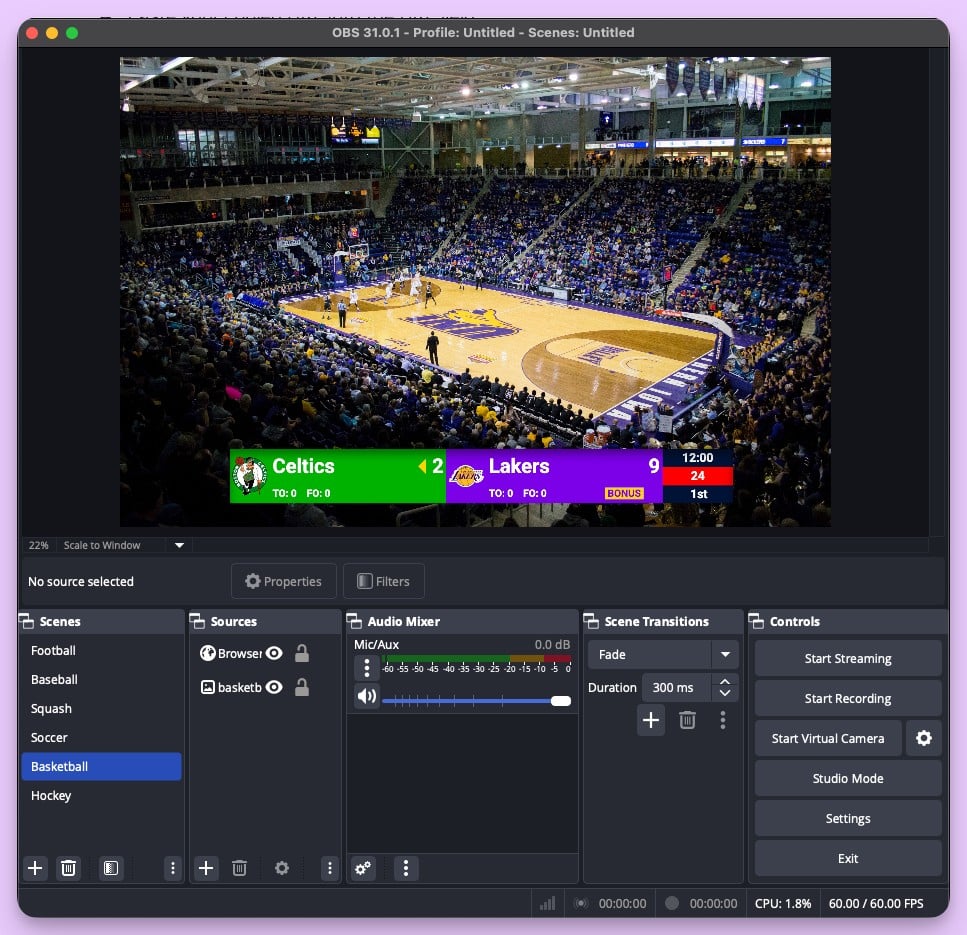
You're streaming a school basketball game on YouTube. The camera's set up, OBS is running, and you added an Uno overlay for the scorebug. It looks clean. Then halftime hits and you realize: there's no way to show the score on the gym TV for the fans in the building. Uno only works as a streaming overlay — it doesn't do in-venue display.
Or maybe you've outgrown Uno's free tier, found the customization limiting for your sport, or need features like a shot clock or game clock that Uno doesn't offer. Either way, there are tools that give you more flexibility.
This page compares KeepTheScore and Overlays.uno across the dimensions that matter most for sports streamers.
Purpose-Built Scoreboard vs General Overlay Platform
Overlays.uno is a broadcast toolkit. It offers 500+ templates across many overlay types:
- Scoreboards
- Tickers and countdowns
- Matchup screens
- Sponsor panels
- And more
Scorekeeping is one feature in a much larger platform.
KeepTheScore is built specifically for scoring. Every feature — the control panel, the display layouts, the sport-specific rules — is designed around the act of keeping score during a live game. If your primary need is a scoreboard, you get a deeper, more purpose-built tool.
The trade-off is clear: Overlays.uno gives you breadth across broadcast graphics. KeepTheScore gives you depth in scorekeeping.
Sport-Specific Scoring Logic
This is where the tools diverge most. KeepTheScore includes 16+ sport-specific scoreboards with built-in rules:
- Basketball: shot clocks, foul tracking, and quarter management
- Baseball & softball: innings, pitch counts, and ball/strike tracking
- Tennis: proper set/game scoring with deuce and tiebreak logic
- Pickleball & badminton: rally scoring with automatic set progression
- Volleyball: set-based scoring with configurable point targets
- Soccer & futsal: match clocks and period management
- Hockey & lacrosse: period tracking with goal attribution
- Football: downs, yards, and quarter management
- Wrestling: period and point-type tracking
Overlays.uno templates use more generic, manual scoring. You increment numbers yourself — the template doesn't know basketball from badminton. For casual streams, that's fine. For games where scoring rules matter (is it a deuce? did the set end?), sport-specific logic prevents errors.
Ease of Setup
Both tools are browser-based and work as OBS browser sources via URL. The setup process is similar: create a scoreboard, copy the URL, paste into OBS.
Where they differ is in the pre-game workflow.
- KeepTheScore is streamlined for pure scorekeeping — pick your sport, set team names, go.
- Overlays.uno offers more visual customization choices (template browsing, color editing, layout options), which means more decisions before you start.
If you want to score a game quickly with minimal fuss, KeepTheScore gets you there faster. If visual customization is your priority, Overlays.uno gives you more options.
Venue Display vs Stream-Only
KeepTheScore works equally well for two outputs:
- Streaming overlay — appears as a transparent scorebug in OBS
- Venue display — runs fullscreen on a gym TV connected via HDMI
One scoreboard, two audiences, controlled from one phone.
Overlays.uno is optimized primarily for streaming. It works great inside OBS, but using it as a fullscreen venue scoreboard on a TV isn't its primary use case.
For organizations that need both — a stream for remote families and a TV for the crowd in the building — KeepTheScore handles both from a single control panel.
Pricing
Both tools offer free tiers. Overlays.uno's free plan includes basic templates with branding. KeepTheScore's free tier gives you functional scoreboards for any sport.
Paid tiers differ in what they unlock:
- Overlays.uno — premium templates, custom branding, and advanced broadcast features
- KeepTheScore — custom logos, advanced themes, ad-free experience, and priority support
The right choice depends on whether you're primarily buying broadcast graphics or scorekeeping capability.
Feature Comparison
| Feature | KeepTheScore | Overlays.uno |
|---|---|---|
| Dedicated sports scoreboard | ✓ | Yes (part of overlay library) |
| Sport-specific scoring rules | Yes (shot clocks, innings, etc.) | Partial (mostly manual) |
| Number of supported sports | 16+ | Multiple (template-dependent) |
| Non-scoreboard overlays (tickers, matchups) | ✗ | ✓ |
| Themed visual templates | Yes (40+) | Yes (500+ across all types) |
| OBS browser source | ✓ | ✓ |
| Stream Deck integration | ✓ | Yes (dedicated plugin) |
| Venue / TV display mode | ✓ | Limited |
| Remote control from phone | ✓ | ✓ |
| External data source integration | ✗ | Yes (Scorebird, Sportzcast) |
Which One Should You Choose?
Choose Overlays.uno if...
- You need full broadcast graphics beyond the scoreboard (tickers, matchups, sponsor panels)
- You integrate with external data sources like Scorebird or Sportzcast
- You want the widest variety of visual templates across all overlay types
Choose KeepTheScore if...
- Your primary need is accurate, sport-specific scorekeeping
- You need sport-specific features like shot clocks, innings, and foul counts
- You also need venue TV display, not just streaming
- You want to get started without creating an account
Frequently Asked Questions
"Can I use KeepTheScore as a streaming overlay in OBS?"
Yes. Add the scoreboard URL as a browser source in OBS, Streamlabs, or vMix. It supports transparent backgrounds for clean scorebug overlays. Full streaming setup guide here.
"Does KeepTheScore work as an in-venue scoreboard too?"
Yes. Open the scoreboard URL in a browser, press F11 for fullscreen, and display it on any TV, projector, or LED wall via HDMI. One tool for both streaming and in-venue display.
"Can I control the scoreboard from my phone while streaming?"
Yes. Share the control panel URL with a scorekeeper who updates from their phone or tablet. The stream overlay updates automatically in real-time.
"What sports does KeepTheScore support for streaming overlays?"
Basketball, football, soccer, volleyball, baseball, hockey, tennis, pickleball, badminton, wrestling, and more — all included in one subscription.
"Does it work with Stream Deck?"
Yes. KeepTheScore offers an Elgato Stream Deck integration so you can control scores with physical buttons during a live broadcast.
"What if my internet drops during a stream?"
Once the scoreboard page loads in OBS, it continues working for basic score updates. For best reliability, use a wired connection or mobile hotspot as backup.
Try KeepTheScore Today
Works in OBS, Streamlabs, and vMix. Set up your first streaming scoreboard in under a minute.
Information about Overlays.uno was accurate as of March 2026. Visit https://overlays.uno for latest details.